Posts

Debugging Report Data Provider Class

https://technet.microsoft.com/en-us/library/gg724081.aspx

Financial Dimensions Setup on a tab page

Image
On particular table add DefaultDimension field and make the relation such that: On the Particular forms CalssDeclearation write following code:  ----------------------------------------------------------------------------- DimensionDefaultingController   dimensionDefaultingController; ------------------------------------------------------------------------------ Override the forms Init method and add following lines of code: ----------------------------------------------------------------------------------------------------------------------     dimensionDefaultingController = DimensionDefaultingController::constructInTabWithValues(     true, true, true/*financialsDimensionsEnabled*/, 0, this,<Tab Page Name> , "@SYS138491");     dimensionDefaultingController.parmAttributeValueSetDataSource(<dataset name_ds>,         fieldStr(<table name>, <field name>)); -----------------------------------...

To Deploy SSRS reports using Microsoft Dynamics Ax 2012 Management Shell

To deploy a specific report, enter the name of the report. For example, to deploy the CustTransList report, enter the following command: Microsoft Dynamics AX Management Shell: *************************************** Publish - AXReport  - ReportName CustTransList *************************************** To deploy two or more specific reports, enter the names of the reports. For example, to deploy the CustTransList and CustTransOpenPerDate reports, enter the following command: Microsoft Dynamics AX Management Shell: ********************************************************** Publish - AXReport - ReportName CustTransList, CustTransOpenPerDate ***************************************************************** To deploy all reports, enter the following command: Microsoft Dynamics AX Management Shell: **************************** Publish - AXReport –ReportName * *******************************

Creating a Querie having multiple Data sources

Image
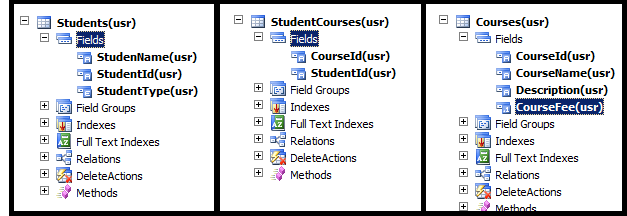
In this post we will be creating a Query having multiple Data sources which be be further used in some other places such as forms, parts, Reports etc. In this scenario we will be having 3 different tables i.e. Students, StudentsCourses and Courses table. We will be creating a query containing these 3 tables as data source in a specific way such that their relation is maintained. Below are the following three tables: Now let's create our desired query: Go to Queries Node in the AOT. Right Click on Query and Select New Query. Rename the Query to "DemoQuery".  We are all done with creating our Query.  Now we will be adding Data Sources to our Query. Open a new AOT (CTRL+D) and navigate to the Data Dictionary --> Tables and select the required table. in this case we will select Students Table and drag it on the Data Source Node of our Query. Expand the Students node and Set the Fields Dynamic Property to Yes. This will add all the Ta...

Queries in Dynamics Ax

Reference:  https://msdn.microsoft.com/EN-US/library/bb278121.aspx The Application Object Tree (AOT) provides a graphical interface for creating queries. These are known as static queries. When a query is created using the AOT, the SysQuery and SysQueryRun classes are used behind the scenes. In Microsoft Dynamics AX, static queries are located in the  Queries  node and contain the following primary sub-nodes: Methods Data Sources Dependent Objects Composite Query Methods The  Methods  node displays all the methods available from a query. In this node you can add a new method to a query. You can also override methods on the  QueryRun  system class and add your own code to class methods inherited from the  QueryRun  class. Only new methods and overridden methods appear in the  Queries  node except for the  classDeclaration  method which is always present. To add a new method: Navigate to the...

Tables Over View

Image
In this post we will be exploring the basics of tables in Dynamics Ax 2012. OVER VIEW: •     Tables store business data. Each table in the AOT has a corresponding table in the underlying Microsoft  SQL  Server database. •     In Microsoft Dynamics AX, tables have advanced features beyond what tables might have in the underlying database. The advanced features include the following: •     Method members – A table can have methods, just as a class in X++ or C# can have methods. •     Table inheritance – A table can extend, or be derived from another table. That same table can be the base table for several derived tables. •     Tables  are specified at  AOT  >  Data Dictionary  >  Tables •     In Microsoft Dynamics AX, tables are located in the Application Object Tree (AOT) under the  Data Dictionary \ Tables  node. Each table contains the following primary...

Array Elements And Table References

Image
In the previous post we explore the basics Extended data Types in Dynamics Ax 2012. To navigate to previous post go to this Link. http://dynamicsaxedtsandbaseenums.blogspot.com/ In this post we will be exploring the EDT's in some detail which include Array elements and Table References which you can see under the node of your EDT. ARRAY ELEMENTS: •     You can create an extended data type in the Application Object Tree (AOT) that contains multiple elements. This enables you to store multiple data elements in a single field that is based on this extended data type.       Array elements are very useful in the scenario where you want to create such EDT in which that particular EDT can contain similar elements, so instead of creating multiple EDT's you can create Array Elements of that particular EDT...   This concept will be more clear with the help of an example:       You have created an EDT for the Address as shown above. Now ...